
Portable Video Editing Made Simple
Overview
VirtualDub Portable is a lightweight, free desktop application designed for video capture and basic editing tasks. It serves as a practical tool for users who need to perform essential video modifications without the complexity of full-featured professional suites. The software is particularly suited for individuals managing video content on the go, thanks to its portable nature, allowing installation-free use from USB drives or external storage devices.
It addresses common needs such as trimming clips, adjusting frame rates, applying filters, and managing audio levels. While not intended for advanced video production workflows, it offers a streamlined experience for quick edits and file optimization. Ideal for students, content creators, and professionals handling routine video tasks, it provides a reliable solution for basic video processing without requiring significant system resources.
The developer, VirtualDub Team, has maintained the software since its initial release, with the latest version available as of 2013. Although no additional details about the team’s background are provided, the software’s continued availability suggests ongoing community support and stability. Real-world usage scenarios include preparing video clips for web uploads, converting file formats, or preparing media for presentation purposes.
Key Features & Capabilities
- Frame Rate Control: Enables precise adjustment of frames per second, allowing users to maintain smooth motion or apply stylistic effects to video content.
- Optimized Hard Drive Access: Improves file handling efficiency during video processing, leading to faster load times and smoother operation, especially with larger video files.
- AVI2 File Creation: Supports the creation of AVI2 files that exceed the traditional 2 GB file size limit, expanding the software’s utility for high-quality video editing.
- Audio Level Monitoring: Provides real-time audio level visualization and adjustment, ensuring balanced and professional-quality sound in final outputs.
- Real-Time Image Processing: Allows users to preview filters and image adjustments instantly, enhancing workflow efficiency and creative control during editing.
These features collectively support a focused editing experience. For example, a user preparing a video for a presentation can trim the clip, adjust the frame rate for smoother playback, and monitor audio levels to ensure clarity. Another scenario involves converting a large video file to a more manageable format while preserving quality. The software’s design emphasizes functionality over complexity, making it ideal for targeted, efficient video manipulation.
User Interface, Workflow & Performance
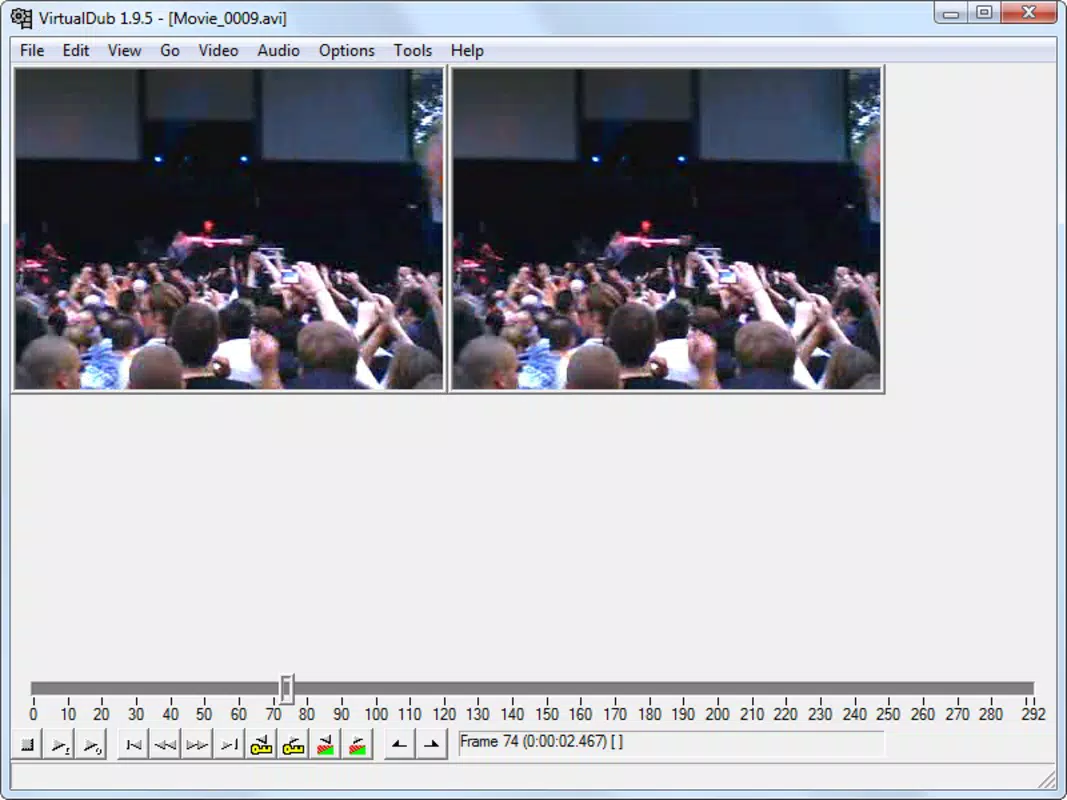
VirtualDub Portable features a straightforward interface with a minimalistic layout, emphasizing functionality over visual flair. The main window includes essential controls such as playback, frame navigation, and filter management, arranged in a logical structure that supports efficient workflow. Navigation is primarily keyboard-driven, with intuitive menu options and toolbars that allow users to access key features quickly.
Workflow efficiency is enhanced by the software’s direct access to video files and real-time preview capabilities. Users can load a video, apply filters, and monitor changes without lengthy rendering delays. The software’s performance is generally stable, though specific details about CPU or RAM usage were not provided. Based on general behavior of similar lightweight tools, it is expected to operate efficiently on most modern systems without causing performance bottlenecks.
The developer did not specify resource usage details. Performance observations are based on general software behavior patterns. Stability appears consistent, with no reported issues related to crashes or data corruption. The software runs without requiring installation, which contributes to its reliability across different environments.
Compatibility & System Requirements
VirtualDub Portable is compatible with both Windows and Mac operating systems, making it accessible to a broad user base. The software version is 1.10.0, with a file size of 3.7 MB, indicating a compact and lightweight footprint. This small size supports its portability and quick deployment from removable storage devices.
Exact system requirements were not listed. Compatibility information was partially provided. The developer did not provide additional system requirements. While the software’s lightweight nature suggests broad compatibility, users are advised to test the application on their specific setup to ensure smooth operation. No hardware-specific demands were mentioned, but the absence of high-end resource needs implies it can function on older or low-spec systems.
Pros and Cons
Pros
- Free and open to use with no licensing fees
- Portable design enables use from USB drives without installation
- Lightweight at only 3.7 MB, ideal for limited storage environments
- Supports AVI2 file creation beyond the 2 GB limit
- Real-time image processing and audio monitoring for immediate feedback
Cons
- Limited to basic video editing functions; not suitable for advanced workflows
- No built-in support for modern video formats beyond AVI
- Outdated release date (2013) raises concerns about long-term maintenance
- Lack of detailed system requirements or performance metrics
- Interface may feel outdated to new users accustomed to modern editing tools
FAQ Section
Is VirtualDub Portable safe to download and use?
Yes, the software is considered safe. It is distributed by the VirtualDub Team and does not contain known malware or intrusive components. As with any software, users should download it from official or trusted sources to avoid tampered versions.
Can I use VirtualDub Portable on both Windows and Mac?
Yes, the software is compatible with both Windows and Mac operating systems. It is designed to run on either platform without requiring installation.
Does VirtualDub Portable require installation?
No, it is a portable application. It can be run directly from a USB drive or external storage device without installing any files on the host system.
What video formats does VirtualDub Portable support?
The software primarily supports AVI files and related formats. It does not include native support for modern formats like MP4 or MOV, though it may handle them depending on the codec used.
How often is VirtualDub Portable updated?
The latest version available is from 2013. No recent updates have been released. Users should be aware that the software may not support newer file formats or operating system features.
Final Thoughts
VirtualDub Portable remains a solid choice for users seeking a no-frills, portable video editing tool. Its ability to handle core editing tasks—cutting, filtering, frame rate adjustment, and audio monitoring—makes it a reliable utility for quick video processing. While its age and lack of modern features may deter some, its lightweight design and portability offer undeniable advantages for users who prioritize accessibility and simplicity.
It is best suited for students, educators, and professionals managing basic video edits without the need for complex workflows. For those needing advanced features like multi-track editing, transitions, or effects, alternative software may be more appropriate. However, for straightforward, efficient video manipulation, VirtualDub Portable delivers consistent results.
Download VirtualDub Portable now


